Concurrency in Python
An overview about concepts, built-in functionality and external libraries
Table of Contents
This assignment will provide an overview about the built-in functionality of Python for concurrent computing. Further it will describe several external libraries, which provide functionality for creating and handling multiple tasks in an optimized way. Several non-standard Python compilers and their way of implementing concurrency will be discussed as well. The goal is to give an overview about the different options to implement concurrency. The last section will compare Python to the Go programming language, which was designed for concurrency from the ground up.
About this paper
Written assignment for the course Programming in Python - DLMDSPWP01_CF, Master of Science - Artificial Intelligence at IU International University. Tutor: Dr. Cosmina Croitoru. Matriculation number: IU14090306.
The original LaTeX source, the bibliography, the code listings and the compiled PDF are available on GitLab: gitlab.com/iu-msc-ai/programming_with_python_dlmdspwp01_cf
Introduction
Concurrency in Python is defined as “concurrent execution of code”.1 The most common ways concurrent execution of code is limited, is either by how the runtime of a programming language implements concurrency and interacts with the operating system and on a lower level the central processing unit (CPU), or by the need to wait for input and output (I/O) devices, the code interacts with. Another way of concurrently executing code is via the graphics processing unit (GPU), which is not supported by built-in functionality of Python (up to version 3.12). All these types, together with the limitations and mitigation, will be discussed later.
Concurrency became more important, since the rise of multicore CPUs. As the number of cores increased, the need and usefulness for concurrent execution of code increased as well. Further the rise of GPUs for scientific computing in Python, especially in the field of machine learning, gave more options for the concurrent execution of code, as GPUs are especially designed for parallel execution of code.
When Python is mentioned in this paper, it is always the most popular implementation of the Python interpreter, CPython and the most current version as of the date of writing, which is 3.12. If other implementations of Python are mentioned, it will be explicitly stated.
Concurrency and parallelism
The concepts of concurrency and parallelism are sometimes used interchangeably, but they are not the same. During concurrent execution “multiple tasks are in progress for overlapping periods of time”.2 This means starting, running and completing them in no particular order, while switching between them. Therefore, concurrency is particularly not about running them in parallel. Parallelism however is about executing multiple tasks at the same time. Therefore, concurrency is a higher level concept than parallelism.
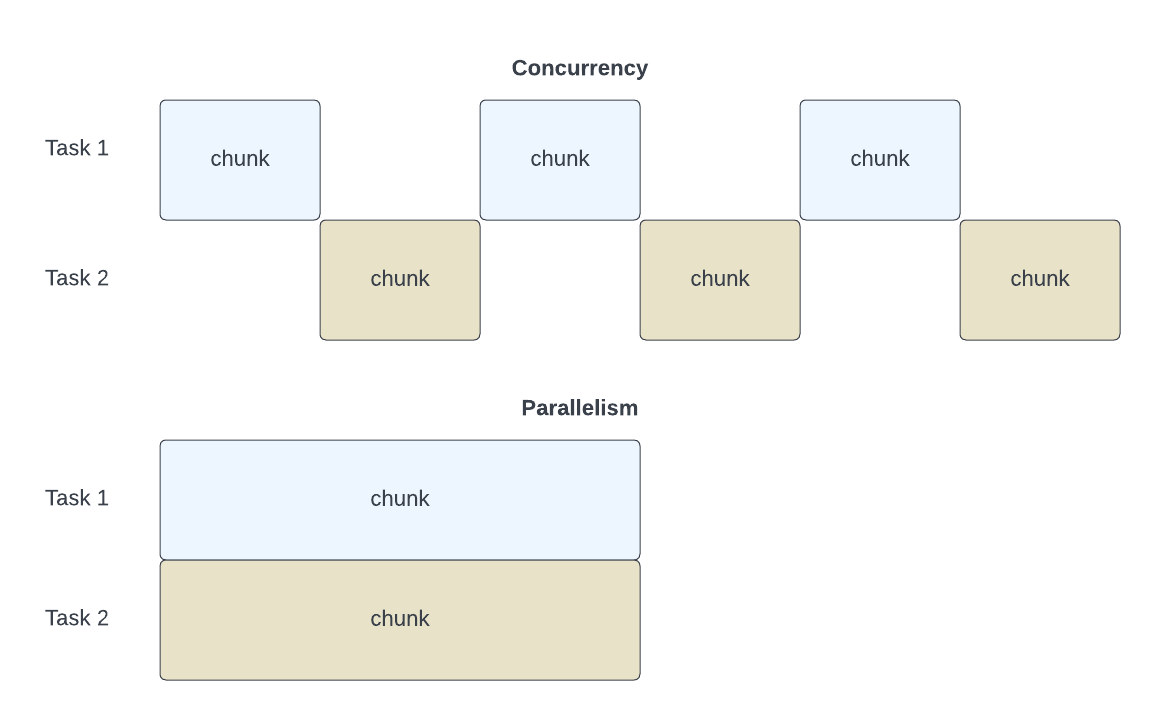
In computing parallelism is usually more than just the parallel execution, but “a type of computation that uses decomposition to split large or complex problems into small tasks”.3 The runtime of the programming language should then manage these smaller tasks effectively. Not all parts of a program are parallelizable though. Amdahl’s law is a formula which can be used to calculate the maximum speedup of a program, when using multiple processors. The formula is as follows:
$$ S = \frac{1}{(1 - P) + \frac{P}{N}} $$
where:
$S$ is the speedup, $P$ is the parallelizable fraction of the program, $N$ is the number of processors.
The handling of multiple tasks always comes with overhead. This overhead can be the time needed for switching between tasks, the handling of the communication between tasks or the synchronization of tasks. This overhead can be quite high in certain situations, and therefore it is not always beneficial to use or implement concurrency. It is advisable to check the code of speed up potential and the expected overhead, before implementing concurrency.
CPython
As mentioned, CPython is the reference implementation of Python. It contains the language specification and the runtime. The runtime has several components, which will be explained here. This level of detail is needed to understand the following sections, which are about optimizing this runtime or exchanging it, when more execution speed is needed.
The main components of the CPython runtime are:
- The parser
- The compiler
- The interpreter
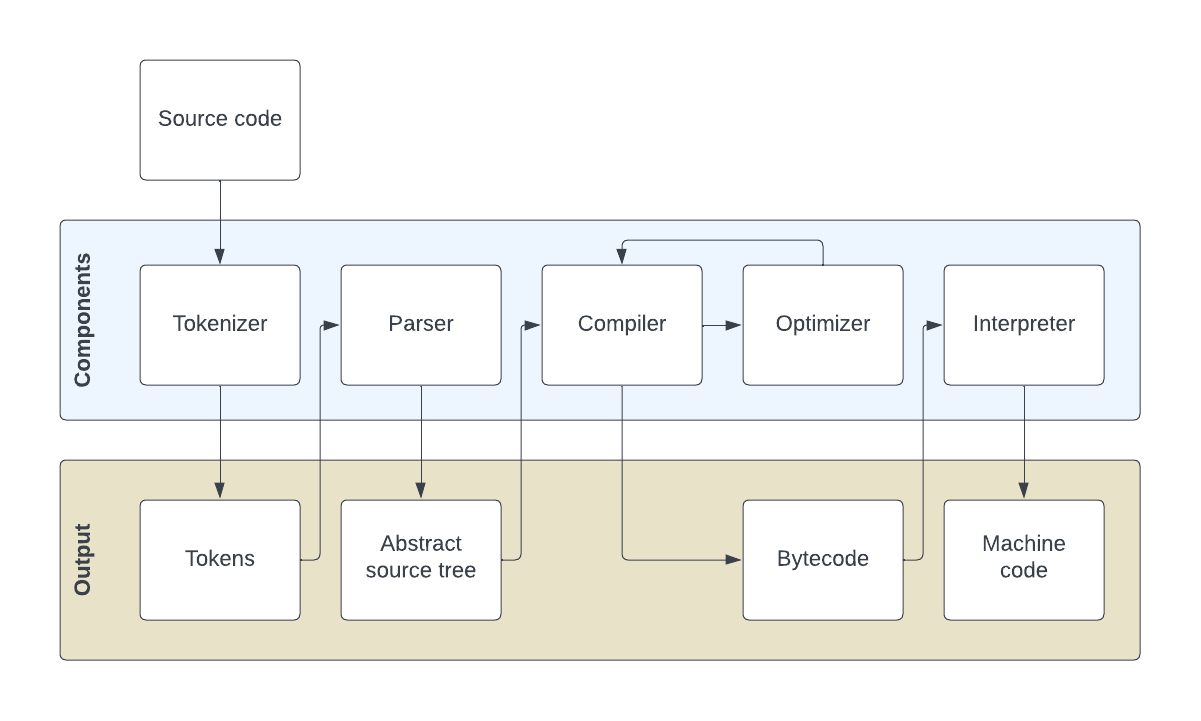
These components come into play after the developer wrote the code and wants to execute it, or during running code in the interactive mode of Python. The following graphic shows the dependencies of these items, with a deeper level of detail. Each of these items will be discussed in detail.
The parser
In general, the parser is responsible for extracting the relevant information from the source code. To do that, the source code is replaced by tokens, which are predefined for certain parts of the language.4 Examples for tokens are the keywords of the language, like if or else, the operators, like + or -, the return statement or the indentation.
The tokens generated from the tokenizer are passed to the parser, which attempts to build an abstract syntax tree (AST). The AST is a tree representation of the source code, which is independent of the Python syntax. The parser itself is implemented in C.
The compiler
After the AST is build, the compiler takes over. The compiler is responsible for translating the AST into bytecode. The bytecode is a low-level representation of the source code. The difference to machine code is that bytecode can not be executed by the hardware, but needs an interpreter to be run. The output of the compiler is stored in a .pyc file. The compiler is implemented in C as well.
Overall CPython is called an interpreted language. Certain steps before the interpreter starts are compiled though. In this case the .pyc file is more a caching mechanism, to save some time during multiple similar runs.5
The interpreter
The Python interpreter in CPython runs as a virtual machine (VM), which makes it easy to run Python on different platforms. The Python interpreter is responsible for executing the bytecode. The VM has representations of machine code stored, for each bytecode element. This means that the VM “executes the machine code corresponding to each bytecode”.5 Therefore the original source code is never translated to machine code, but down the chain of the mentioned components get replaced. Until in the last step it is replaced by machine code, which the hardware (in most cases the CPU) can execute.
The Python interpreter has a locking mechanism, called the global interpreter lock (GIL), which will be discussed in detail later (compare: Global interpreter lock). As all other mentioned components, the Python interpreter is implemented in C.
Comparing threads and processes
The whole CPython runtime runs within a single process, which creates certain limitations. First it is important to explain the conceptual differences between processes and threads. A process is an “abstraction provided by the OS of a running program”.6 A process has its own memory allocated, which includes the heap and the stack, a process control block and stores the program code which should get executed. A thread is very much like a process, with the difference that it shares the memory space of the process and therefore shares memory with other threads as well.7
So processes and threads can run code and therefore are important execution mechanisms in concurrent programming. Both of them are used in different cases though. As a general rule of thumb, threads need to be increased for tasks which are blocked by I/O, while an increase in processes is useful for tasks which are limited by CPU performance.
A more detailed comparison of threads and processes is as follows:
- Threads are useful when there are a lot of I/O operations to perform, and the wait time for one to finish before starting the next one is too long.
- Processes are useful when the tasks have a lot of compute work to be done and multiple CPUs, CPU-cores or one or more GPUs exist, to leverage this type of execution.
Threads
A thread can be defined as “ordered stream of instructions that can be scheduled to run”.8 If multiple threads are scheduled to run at the same time it is called multithreading. Further a thread has the following properties:
- Threads can interact with shared resources.
- Threads can be paused and resumed.
- Communication between threads is possible.
- Threads are able to share memory and read and write different memory addresses within the process.
The execution of multiple threads at the same time creates the problem of race conditions though. The order of execution of threads is no longer sequential, so threads could read and write into the inherently shared memory space in a not predefined order or even at the same time. In the standard Python runtime race conditions are prohibited on the bytecode level by the global interpreter lock (compare Global interpreter lock). To prevent other race conditions locking mechanism exists, so just one thread at a time can use locked variables or I/O devices (compare Threading). Besides that the user is responsible to write code which does not create race conditions.
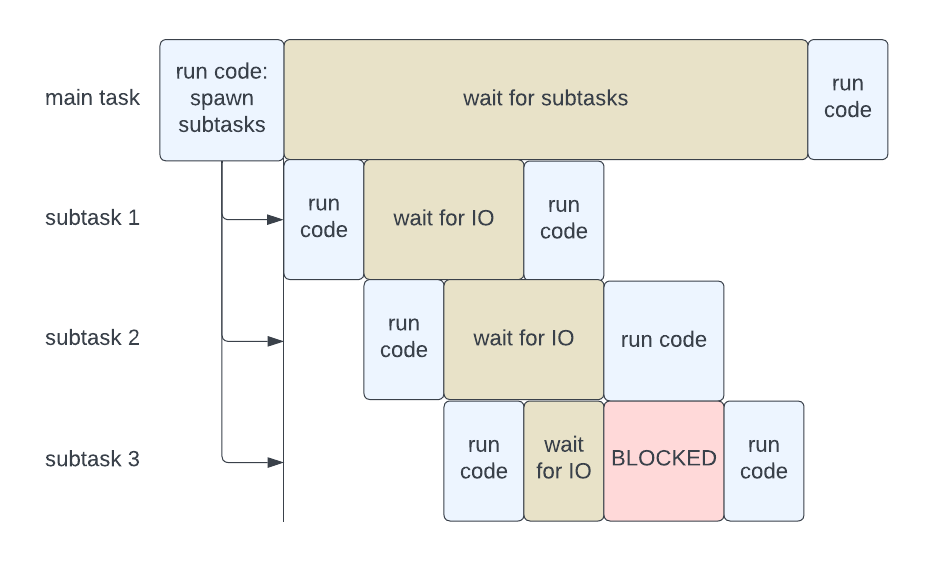
Threads are always bound to the Python interpreter and therefore can not run in parallel (compare Global interpreter lock). Because of this limitation threads are mostly used to execute tasks limited by I/O, like reading and writing files or network communication. As such tasks are usually not limited by the CPU.
A potential execution layout of threaded code could look like following:
Processes
Compared to threads, processes can run in parallel. As processes are managed by the operating system, the operating system (OS) is free to place a new process on any CPU or core it deems fit, to create the maximum performance. Modern operating systems are optimized to place processes and move them around for improved execution time.
To create a new process of the Python runtime, the full runtime in launched again, which comes with the full overhead of all elements though.9 Another downside is, that processes have no internal way of communicating with another, as threads have. A process in itself can have multiple threads again then.
So with multiprocessing it is possible to enhance the execution of tasks which are limited by computational power, as the tasks can be distributed across multiple CPU cores to use all available compute time. The Python multiprocessing API does not allow spawning processes on the GPU directly though, as this is not supported by the Python interpreter. There are ways to circumvent this limitation though, which will be discussed later (compare PyCUDA and CuPy).
Global interpreter lock
When a new thread is created in Python, a new operating system thread is launched and then handled by the operating system itself. Threads share the same memory space and resources of the parent process, which is the Python runtime. As mentioned, this creates the risk that threads could write into the same memory address in a not predefined order. To prevent this Python has the concept of a global interpreter lock (GIL).
The GIL is a mutual exclusion lock (mutex) which prevents the Python runtime from executing the bytecode in parallel.5 This lock is necessary mainly because CPython’s memory management / garbage collection is not designed thread-safe (explained a bit later).
The GIL can just be acquired by one thread at a time. This means the threads, which are scheduled by the OS, have to communicate with the Python runtime to acquire and release the GIL. As the OS is responsible for the scheduling, this is called preemptive multitasking and is computational expensive, as the OS needs to stop threads and checks for handing over to other threads on a regular basis. This communication slows down the execution of the code overall. The advantage of preemptive multitasking on the other hand is that each process is guaranteed operating time. Another way of implementation is called cooperative multitasking and is explained later.
Python threads are supposed to release the GIL when doing I/O operations, like reading or writing files or network communication.10 This allows the execution of other threads in the meantime, which is the most common use case of concurrency in Python and is the reason why threads are mostly used for I/O bound tasks, like reading and writing files or network communication.
The mentioned garbage collection in Python is done by globally counting references to an object. The main part of creating and removing references is done during a bytecode operation.11 As soon as there are no references to the object anymore, it is removed from memory. This procedure is not thread safe, as the reference count could be changed by another thread at any time. As the execution of threads in parallel is prevented in CPython by the GIL, the garbage collector has to acquire the GIL, to be able to run.
The GIL is debated heavily in the Python community and there are developments to get rid of this concept.12 The plan for Python 3.12 was to at least move to a GIL per sub-process. This work was not finished in time though and was postponed to Python 3.13.13 There are other runtimes of the Python programming language which do not have the concept of a GIL implemented. Further there are ways to circumvent the GIL, by using external libraries, which are written in C or other lower level languages.14 These concepts will be discussed later on multiple occasions.
Built-in functionality
Python has a lot of built-in functionality. This includes APIs for threading, multiprocessing and asynchronous execution of code. These will be discussed in detail now. Several external packages are based on this built-in functionality to provide additional functionality and will be discussed later.
Threading
To create, run and shut down threads Python has a low-level threading _thread API available. A human user would mostly not use the _thread library directly, but a higher level abstraction, like the threading or the concurrent.futures library, which makes handling threads easier.15
The threading library requires multiple steps to set up threading correctly. First a resource pool needs to be created. The following block of code creates a default resource pool. The semaphore is a counter, to keep track and set a limit of the number of threads which are active in parallel (but do not run in parallel).
import threading
import logging
import time

class ActivePool(object):
    def __init__(self):
        super(ActivePool, self).__init__()
        self.active = []
        self.lock = threading.Lock()

    def makeActive(self, name):
        with self.lock:
            self.active.append(name)
            logging.info("Running")

    def makeInactive(self, name):
        with self.lock:
            self.active.remove(name)
            logging.info("Stopped")
Listing 1: Threading example in Python - part I
After this a user can define certain variables which are locked. This is helpful in case multiple threads would need to write in to the same files or need to use other input or output resources or global variables. When the threads run, the lock can be acquired by a single thread, then just this thread is allowed to use the locked resource. After the thread finished using the resource it should give the lock back to the pool and another thread could acquire the lock. The following code gives examples for a global file to write errors, as a very simple logging implementation and another file to write down the runtime of each thread.
my_global_error_file = threading.Lock()
my_global_runtime_file = threading.Lock()
Listing 2: Threading example in Python - lockfile
The next code block will create and start the threads and afterwards join them again in the main script. Without the thread.join command the Python interpreter would end without any regards for the runtime of the threads. This could end the Python process before the threads are finished, which would end the threads as well.
pool = ActivePool()
s = threading.Semaphore(3)

my_threads = [100_000_000, 200_000_000, 300_000_000]
threads = []

start_time = time.time()

for x in my_threads:
    t = threading.Thread(
        target=my_threaded_function, name=f"Thread-{x}",
        args=(s, pool, x,)
    )
    t.daemon = True
    threads.append(t)
    t.start()

[thread.join() for thread in threads]

print(f"{time.time() - start_time:.2f} seconds")
Listing 3: Threading example in Python - part II
The code, which should be executed as threads, needs a few more steps to be set up correctly. The function needs the pool and semaphore as input. The following code block shows such an example.
def my_threaded_function(s, pool, x):
    with s:
        name = threading.current_thread().name
        pool.makeActive(name)

        start_time = time.time()
        for y in range(x):
            y*y
        print(f"finished input {x}: {time.time() - start_time:.2f} seconds")

        my_global_runtime_file.acquire()
        # e.g. run the write to file function for the my_global_runtime_file
        my_global_runtime_file.release()

        pool.makeInactive(name)
Listing 4: Threading example in Python - part III
Overall this example takes around 14.5 seconds to execute on an example system. This takes the same time as sequential code, as this code is limited by CPU performance and not by I/O operations.
Multiprocessing
In contrast to threading, multiprocessing creates new instances of the Python process and therefore the interpreter, which have then their own GIL. The CPU is able to handle these new Python processes, called sub-processes, independently and can run them on different CPU cores, which makes true parallel multiprocessing possible. The multiprocessing API allows creating pools, which are able to distribute input data across the sub-processes and therefore allow data parallelism.9
The following script shows an easy example for multiprocessing.
from multiprocessing import Process
import time

def my_multiprocessed_function(x):

    print(f"start {x}")
    start_time = time.time()
    for y in range(x):
        y*y
    print(f"finished input {x}: {time.time() - start_time:.2f} seconds")

input = [100_000_000, 200_000_000, 300_000_000]
my_processes = []

start_time = time.time()
for x in input:
    single_process = Process(target=my_multiprocessed_function, args=(x,))
    my_processes.append(single_process)
    single_process.start()

for single_process in my_processes:
    single_process.join()

print(f"{time.time() - start_time:.2f} seconds")
Listing 5: Multiprocessing example in Python
The multiprocessing API has a queuing mechanism as well, to just produce the user defined amount of sub-processes in parallel. Further there is a similar locking mechanism as in the threading API.
This example, which does the same computation as the threading example, takes around 8.04 seconds to execute on an example system, with 4 CPU cores. This is a significant speedup compared to the threading example, as this code is limited by the CPU and not by I/O operations.
Asyncio
Another subtype of concurrency is asynchronous (async) programming and execution. It is comparable to multithreading, but implements the concept of cooperative multitasking via coroutines. In contrast to preemptive multitasking, cooperative multitasking is not handled by the OS, but by the Python runtime and therefore can be managed by the user.
The asyncio library provides a way where code, in which awaitables are declared, can continue with other parts, until the awaitable gets the desired response.16 Awaitables can be coroutines, tasks, and futures. A coroutine is a method that can be paused and resumed. A task is a subclass of a coroutine and a future is a low-level awaitable, which is used to build other awaitables.17
Compared to a normal thread from the threading API, a coroutine is just a few kilobytes in size, while a thread is roughly 2MB in size. This means the creation of a coroutine is significantly faster than the creation of a thread and lets a user create more concurrent tasks on a same sized device, if needed.18 Therefore a main application of asyncio is to handle large amounts of I/O bound tasks concurrently.
The user can define and run coroutines via the keywords async and await. These keywords “make asynchronous code look like it is run synchronously”.19 While the async keyword defines a coroutine, the await keyword is set by the user to pause the execution of the coroutine until the awaited part is finished. This makes the implementation cooperative and should make the asynchronous code easier to read and understand.
The asyncio library can cooperate with the threading and multiprocessing libraries in Python as well. On a lower level a coroutine is a specialized version of a Python generator function and can suspend its execution, and it can indirectly pass control to another coroutine for some time.
The following code does the same calculation as the previous examples, but with the asyncio library. The execution time is around 14.5 seconds, which is the same as the threading example, as asyncio makes this code threaded as well. In this case the user defines when code (a coroutine) should be paused and resumed though, via the await asyncio.sleep(0.1). This command tells the runtime to pause for 0.1 seconds and therefore it can try to run a different part of the code. As in this example the same function is executed multiple times, the next iteration of the function can run, until the sleep command is executed there. So the script switches between executions of the functions. In a real world scenario mostly I/O would be awaited.
import asyncio
import time

async def async_coroutine(x):
    print(f"start {x}")
    local_start_time = time.time()
    await asyncio.sleep(0.1)
    for y in range(x):
        y * y
    print(f"finished input {x}: {time.time() - local_start_time:.2f} seconds")


async def main():
    start_time = time.time()

    async_coroutines = []
    my_threads = [100_000_000, 200_000_000, 300_000_000]

    for x in my_threads:
        async_coroutines.append(async_coroutine(x))
    await asyncio.gather(*async_coroutines)

    print(f"{time.time() - start_time:.2f} seconds")


asyncio.run(main())
Listing 6: Example of concurrency in asyncio
Other implementations of asynchronous programming, for different use cases, are Trio and Curio. Both are not built-in libraries of Python.
Extending Python with other languages
Python allows the easy implementation of other programming languages, which are more suited for concurrency, like C or C++. There are two ways of doing this:
- A Python extension module which is imported to Python via
importand then used like a normal Python module. - Calling a shared-library subroutine directly from Python using the
ctypesmodule
The advantage of implementing lower level languages in Python, is that these languages are not bound to the GIL and therefore can be executed in parallel natively. Both mentioned options of implementing C will be discussed in the following sections.
Python extension module
Python provides APIs as a way to interact with other languages. A commonly used example is the Python C API which allows the implementation of Python modules in C. In such cases a module is written in C and then compiled to a shared library. Such a shared library can be imported in Python as an extension module and used like a normal Python module.20 Many of Python’s built-in modules are written that way. Examples are the math module or the random module.21
A Python extension module can implement new built-in object types and can call C library functions and system calls. This is not possible natively in Python. The Python API provides a set of functions, macros and variables, which are used to interact with Python from C and can be accessed via the Python.h header file. This implementation is specific to CPython and does not work in other Python implementations, like PyPy (compare PyPy).
Ctypes
A ctype module lets you interface with C code, directly from Python. Compared to an extension module this is a more portable implementation of Python and C. Ctypes is a foreign function library for Python. It provides C compatible data types, and allows calling shared libraries or functions, like DLLs in a Windows environment. It can be used to wrap these libraries in pure Python.22
Ctypes allow you to interface with C-code directly from Python.23 This direct interaction with C creates a lot of danger though, as this is not memory safe anymore. Therefore, a few wrappers for ctypes exist, which make the interaction with C-code safer. One of these wrappers is cffi. It is explicitly made for “calling C code from Python without learning a 3rd language”.24
External libraries
Python has multiple external libraries, which have ways of implementing concurrency. There are two common strategies. Either these libraries use the functionality of the threading and multiprocessing APIs, or they circumvent the GIL via implementing a lower level language like C. A selection of the most popular libraries for scientific computing, with a focus on Artificial Intelligence, will be discussed and their strategy for concurrency explained.
NumPy
NumPy is the most famous Python library for scientific computing. It provides multidimensional array objects, which are able to process large amounts of data quickly. Further it provides all relevant methods to operate on these arrays. NumPy is famous for being a significantly faster implementation for arrays than the Python built-in libraries and is the basis for many other Python libraries. Some of them will be mentioned here later.
A lot of the NumPy functionality is implemented in C and C++, which has the mentioned advantage to circumvent the GIL during execution of the code.25 Additionally, to the implementation of NumPy in a lower level language, it relies on a Basic Linear Algebra Subprogram (BLAS) library for its linear algebra operations, typically Intel MKL or OpenBLAS. BLAS libraries are implemented in C or Fortran and therefore can be executed in parallel as well. On top of BLAS the LAPACK library exists, which functions are a higher level implementations and therefore rather used.26
Because of these implementation details NumPy is able to use multiple CPU cores, when executing certain functions. This is done by the NumPy library itself and does not require any user interaction. The following example code should show the speed of an implementation in NumPy and should show activity on multiple CPU cores.
import numpy as np

a = np.random.rand(9_000,9_000)
b = np.random.rand(9_000,9_000)

print(np.dot(a, b))
Listing 7: Example of concurrency in NumPy
Besides NumPy being the basis for many other libraries, nowadays, new libraries try to be a drop-in replacement for NumPy, while being even better equipped for concurrency. One example is CuPy, which is a NumPy compatible library for GPU accelerated computing with CUDA and provides a subset of the NumPy API27 (compare PyCUDA and CuPy). Another example is Bohrium, which will be discussed later (compare Bohrium).
TensorFlow and PyTorch
TensorFlow and PyTorch are currently the most used libraries for machine learning and deep learning. Both libraries are able to use one or more GPUs for their computations via the CUDA framework.
TensorFlow can use multiple GPUs by splitting the data and the model across the GPUs and then combining the results again.28 This is called data parallelism and model parallelism respectively. With these APIs the underlying work is abstracted away from the user and the user can focus on the machine learning model itself.
In case of data parallelism the data gets split up on multiple devices or multiple machines. Each of these GPUs then handle different batches of the data. Afterwards the results are merged. There are many ways to accomplish this. The biggest difference is in whether a merge is initiated after every batch or whether the processes are more loosely coupled. This has an effect on how the model learns.
As an example the method tf.distribute.MirroredStrategy makes training on one machine with multiple GPUs possible. This strategy creates a copy of all variables in the model on each device. Then it uses an all-reduce algorithm to keep them in sync. This is called synchronous training.29
In case of model parallelism different parts of a single model are run on different devices. For this to work well, the model needs to have a parallel structure in itself, so each part of the model can hold a chunk of the weights. A good example for model parallelism are transformer networks, which are commonly used in natural language processing. The tf.device method is a context manager and makes it possible to place operations on certain devices.
PyTorch has the torch.distributed package, which provides a way to run PyTorch code on multiple machines. It has a similar API for data parallelism. The torch.distributed package provides a torch.nn.DataParallel module, which replicates the model on multiple devices and then merges the results. Further PyTorch has a torch.nn.parallel.DistributedDataParallel module, which can run the model on multiple devices over network connections.
Another useful package is the torch.multiprocessing module, which is a wrapper for Pythons built-in multiprocessing library, but can run code in multiple processes but with a shared memory and can “send it to other processes without making any copies”.30
In addition PyTorch has lower level APIs to place data and models on the GPU and do calculations with it. The to(device) method can place data and models on the GPU and the torch.cuda module can then do calculations with it.
Both libraries make use of the concurrency implemented in NumPy and therefore are able to use multiple CPU cores as well. Tensorflow implemented an experimental subset of the NumPy API, to run NumPy code on the GPU.31
Bohrium
Bohrium is a project to “map vector operations onto a number of different hardware platforms”.32 The project supports Python, C and C++. Different platforms could be GPUs, multicore CPUs, FPGAs and clusters of them. The Bohrium API is compatible with the NumPy API and therefore can be used as a drop-in replacement for NumPy.33 In most cases NumPy can be replaced by Bohrium by just renaming a NumPy import to import Bohrium as numpy. The development of the project has become stale, but it is still a good example of how to implement concurrency in Python.
Bohrium is not a concurrent library per se, it reads the original Python code and defines an intermediate vector bytecode language and provides a runtime environment for executing the bytecode. The execution back-end is then able to execute the intermediate vector bytecode without any Python/NumPy knowledge.34 Therefore Bohrium resembles a different Python runtime, more than a library for concurrent execution of code.
The following example shows the previous NumPy code executed in Bohrium. The only difference is the import of the Bohrium library instead of the NumPy library. Depending on the device Bohrium is executed on, the execution time should be significantly faster than the NumPy implementation.
import bohrium as np

a = np.random.rand(9_000,9_000)
b = np.random.rand(9_000,9_000)

print(np.dot(a, b))
Listing 8: Example of concurrency in Bohrium
PyCUDA and CuPy
GPUs are compared to CPUs specifically designed for parallel execution of code. With a GPU available, the primary process usually still runs on the CPU, but outsources parts to the GPU. This is especially useful for computationally expensive and easy parallelizable tasks, like matrix multiplications.
Different GPU manufacturers provide APIs for their GPUs. The most widely used GPUs are from Nvidia, which provides APIs via their CUDA framework. A more open API for GPU programming is OpenCL. Both APIs have libraries for Python available.
PyCUDA is the respective library for executing Python code on Nvidia GPUs and allows the execution of Python code on GPUs. This is done by defining a so-called kernel function, which is then executed on the GPU. In PyCUDA a kernel function is defined in C and then called via the Python script. The kernel function is executed on the GPU and the result is then returned to the Python script. The following example of PyCUDA shows a computationally expensive task, which could run on a Nvidia GPU.
import pycuda.autoinit
import pycuda.driver as drv
import numpy

from pycuda.compiler import SourceModule
mod = SourceModule("""
__global__ void multiply_them(float *dest, float *a, float *b)
{
  const int i = threadIdx.x;
  dest[i] = a[i] * b[i];
}
""")

multiply_them = mod.get_function("multiply_them")

a = numpy.random.randn(400).astype(numpy.float32)
b = numpy.random.randn(400).astype(numpy.float32)

dest = numpy.zeros_like(a)
multiply_them(
        drv.Out(dest), drv.In(a), drv.In(b),
        block=(400,1,1), grid=(1,1))
Listing 9: Example of concurrency in PyCUDA
The kernel function can be infinitely more complex in a real world scenario. There are some limitations though, which mostly align with the limitation of concurrency in general, like the need for synchronization of threads and the need for communication between threads. Further recursive programming is not supported.
CuPy on the other hand is a higher level abstraction for running code on Nvidia GPUs. As mentioned, it can run as a drop-in replacement for NumPy and even for SciPy and therefore behaves like Python and the user does not need C knowledge. The option to create kernels functions in C exists in CuPy as well though.
With both libraries the data needs to be transferred to the GPU, which could be relatively time intensive. So the usefulness depends on how long the GPU is used and how much data needs to be transferred. In case new data is created, like a randomly initialized array, this can be done directly on the GPU.
The same example code used for NumPy earlier takes in a Google Colab environment with a TPU runtime ~188 µs to run, while it takes with NumPy ~832 µs.
import cupy as np

a = np.random.rand(9_000,9_000)
b = np.random.rand(9_000,9_000)

print(np.dot(a, b))
Listing 10: Example of concurrency in CuPy
Other Python compilers
Besides CPython there are other compilers available for the Python programming language. These compilers are sometimes more useful for the concurrent execution of code, as they either do not have the concept of the GIL or have other ways of making concurrency efficiently possible. The most famous compilers are Cython and PyPy. A newer compiler is Numba, which provides increased execution speed on GPUs by default.
Cython
Cython is a compiler for Python code and allows you to write Python code that can do “calls back and forth from and to C or C++ code natively at any point”.35 Cython should feel “like Python while providing easy access to C”.36 This combines the advantage of a compiled and statically typed language like C with the ease of use of Python.
The Cython compiler is used as compiler of choice for a variety of public Python libraries, like NumPy and SciPy.2537 A compiled Cython module is called a shared library and is imported via the Python extension module API, described earlier, and can be used then like a normal Python module.
Further Cython can wrap existing C libraries with Python, to make them easily usable by a Python developer.38 This is done by declaring an extern block, which points to the C library. In such cases usually a .pxd file is created, which works like a header file in C and defines the interface to the C library.
PyPy
PyPy is an implementation of Python, with an interpreter written in RPython. RPython is a “restricted subset of the Python language”, which means it “limits the ability to mix types in arbitrary ways” and is “specifically designed for writing interpreters”.39
The biggest difference is that PyPy uses a just in time compiler (JIT) to increase the speed of Python. Compared to CPython which is interpreted, a JIT compiler compiles the most used parts of the code into machine code and therefore is able to implement efficiency gains. This is done by the PyPy runtime and does not need any user interaction.
The PyPy compiler implementation is a so-called tracing JIT compiler. Tracing JIT compiler are build on the following basic assumptions:40
- programs spend most of their runtime in loops
- several iterations of the same loop are likely to take similar code paths
PyPys approach to concurrency is called “massively concurrent style”41 and uses continulets. This is comparable to the implementation of tasklets in “Stackless Python”. Tasklets, which are small threads with very little memory overhead, provide a way of communicating via dedicated channels.42 This concept is comparable to the discussed asyncio library or goroutines in the Go programming languages as well (compare Comparisons to the Go programming language).
Continulets, as tasklets, are significantly lighter in memory, which makes the creation of threads faster than via the built-in threading API of Python. Because of these reasons PyPy is chosen when speed is needed and writing in lower level languages is not useful or wanted. The disadvantage is that PyPy can not run Python code which is written in C directly. Nowadays, there are ways to circumvent this limitation though, which are comparable to CPython.43
Numba
Numba is another example of a JIT compiler for Python. The implementation for the user is easier than comparable JIT compilers for Python though, as there is no need to replace the standard Python interpreter. Numba is invoked by a decorator in the Python code and then compiles the code to LLVM bytecode, which is then compiled to machine code.44 LLVM is a compiler infrastructure, which is used by many compilers and provides a language agnostic architecture.
The JIT compiler then applies optimizations to the code, like loop unrolling, vectorization and parallelization and therefore tailors the bytecode to the devices CPU or GPU capabilities. Even translating code to CUDA or OpenCL code is possible.45
Comparisons to the Go programming language
Python was never designed for concurrency from the ground up. Especially the existence of a GIL should make this apparent. A language which was designed from the ground up for concurrency though is Go. Go was developed in 2007 by Google LLC, to provide a language which is easy and safe to use and has native concurrency.46 This section should compare the features Go provides for concurrency to the features of the Python programming language, to learn even more about different ways of implementing concurrency.
Go has the concept of goroutines and channels, to provide concurrency. Goroutines are lightweight threads, which are managed by the Go runtime. The Go scheduler is able to place these goroutines to multiple CPU cores if needed. Compared to Python, where threads are scheduled by the operating system, this implementation is faster, as it does not need to sync via the kernel space of the OS.
The flexibility of goroutines comes with the burden that the programmer has to be aware to avoid race conditions though.46 One concept that helps with that are channels, which are used to communicate between the goroutines. The following code shows a simple example of this interaction.
The first listing defines a function called producer. The producer function creates several messages and sends them to a channel. The <- operator is used to send this data to the channel and, as you see later, to receive data from the channel.
package producer

import (
	"fmt"
	"sync"
)

func Producer(ch chan<- string, wg *sync.WaitGroup) {
	defer wg.Done()

	// Produce messages and send them to the channel
	for i := 1; i <= 5; i++ {
		message := fmt.Sprintf("Message %d", i)
		ch <- message
	}

	// Close the channel to signal that no more messages will be sent
	close(ch)
}
Listing 11: Example of concurrency in Go - producer
The next listing shows a function called consumer. The consumer function receives a message from a channel and prints it to the console. To make clear that the consumer is executed in a separate thread, there is a random sleep function implemented. Therefore, the user should see the messages displayed via the print statement in a random order.
package consumer

import (
	"fmt"
	"math/rand"
	"sync"
	"time"
)

func Consumer(ch <-chan string, wg *sync.WaitGroup) {
	defer wg.Done()

	// Consume messages from the channel until it's closed
	for message := range ch {
		sleepDuration := time.Duration(rand.Intn(10)) * time.Second
		time.Sleep(sleepDuration) // Simulate some work

		fmt.Println("Received:", message)
		fmt.Println("Sleep:", sleepDuration)

	}
}
Listing 12: Example of concurrency in Go - consumer
The main function creates a channel to propagate messages, which is used by the producer and consumer function. The channel is created by the keyword make and then defines the type of the channel. In this case the channel is of type int. The channel can from then on out be used to send and receive data. Then the script launches the producer and consumer functions as goroutines, which is visible via the go code word, and hands over the channel to them. The functions are then executed in a separate thread. Further a synchronization group is created with the wait command at the end of the script. This makes sure the main program does not end before the threads are finished. This behaviour is similar to Python.
package main

import (
	"sync"

	"./consumer"
	"./producer"
)

func main() {
	// Create a channel for communication
	messageChannel := make(chan string)

	// Use a WaitGroup to wait for both goroutines to finish
	var wg sync.WaitGroup
	wg.Add(2)

	// Start the producer goroutine
	go producer.Producer(messageChannel, &wg)

	// Start the consumer goroutine
	go consumer.Consumer(messageChannel, &wg)

	// Wait for both goroutines to finish
	wg.Wait()
}
Listing 13: Example of concurrency in Go - main function
A goroutine is called a lightweight thread. Compared to normal threads, which are roughly 2MB in size, a goroutine is just 2KB in size.47 Goroutines are therefore comparable to the tasklets in PyPy (compare PyPy) or the coroutines in asyncio (compare Asyncio). And with the Go runtime responsible for scheduling these threads, goroutines use a cooperative scheduling method, comparable to asyncio as well.
As mentioned, in Python the GIL simplifies a lot of low level details like memory management like garbage collection. This is the reason why Python is so easy to use. Go found other ways to implement memory management and garbage collection, while keeping the simplicity for the user. The burden of garbage collection is handled by a sophisticated tracing algorithm in Go, which builds object graphs, via marking the occurrences and will just sweep unneeded memory after this is done.48
So overall concurrency comes with challenges in any programming language. As the Go programming language is designed for concurrency, it has a lot of advantages out of the box in this field. Python programmers found a lot of ways to provide functionality for concurrent execution of code though, and therefore Python is able to compete with other programming languages in this field.
References
Python Software Foundation - Concurrent Execution, 2024. https://docs.python.org/3/library/concurrency.html ↩︎
Bobrov, Kiril - Grokking Concurrency. Manning, 2024, p. 37. ↩︎
Bobrov, Kiril - Grokking Concurrency. Manning, 2024, p. 25. ↩︎
Ike-Nwosu, Obi - Inside The Python Virtual Machine. Leanpub, 2018, p. 11. ↩︎
Python Software Foundation - Glossary, 2024. https://docs.python.org/3/glossary.html ↩︎ ↩︎ ↩︎
Arpaci-Dusseau, Remzi H.; Arpaci-Dusseau, Andrea C. - Operating Systems: Three Easy Pieces. Arpaci-Dusseau Books, 2014, p. 26. ↩︎
Arpaci-Dusseau, Remzi H.; Arpaci-Dusseau, Andrea C. - Operating Systems: Three Easy Pieces. Arpaci-Dusseau Books, 2014, p. 263. ↩︎
Forbes, Elliot - Learning Concurrency in Python. Packt Publishing, 2017, p. 45. ↩︎
Python Software Foundation - multiprocessing - Process-based parallelism, 2024. https://docs.python.org/3/library/multiprocessing.html ↩︎ ↩︎
Python Software Foundation - GlobalInterpreterLock, 2024. https://wiki.python.org/moin/GlobalInterpreterLock ↩︎
Shaw, Anthony - CPython Internals: Your Guide to the Python 3 Interpreter. realpython.com, 2021, p. 205. ↩︎
Gross, Sam - PEP 703 – Making the Global Interpreter Lock Optional in CPython, 2024. https://peps.python.org/pep-0703/ ↩︎
faster-cpython - Our plan for Python 3.13, 2024. https://github.com/faster-cpython/ideas/blob/main/3.13/README.md ↩︎
Forbes, Elliot - Learning Concurrency in Python. Packt Publishing, 2017, p. 67-68. ↩︎
Python Software Foundation - threading - Thread-based parallelism, 2024. https://docs.python.org/3/library/threading.html ↩︎
Fowler, Matthew - Python Concurrency with asyncio. Manning Publications, 2022, p. 2-3. ↩︎
Python Software Foundation - Coroutines and Tasks, 2024. https://docs.python.org/3/library/asyncio-task.html ↩︎
Fowler, Matthew - Python Concurrency with asyncio. Manning Publications, 2022, p. 17. ↩︎
Fowler, Matthew - Python Concurrency with asyncio. Manning Publications, 2022, p. 3. ↩︎
Python Software Foundation - Extending Python with C or C++, 2024. https://docs.python.org/3/extending/extending.html ↩︎
Python Software Foundation - math - Mathematical functions, 2024. https://docs.python.org/3/library/math.html ↩︎
Python Software Foundation - ctypes - A foreign function library for Python, 2024. https://docs.python.org/3/library/ctypes.html ↩︎
NumPy Developers - Using Python as glue, 2024. https://numpy.org/doc/stable/user/c-info.python-as-glue.html ↩︎
Rigo, Armin; Fijalkowski, Maciej - CFFI documentation - Goals, 2024. https://cffi.readthedocs.io/en/stable/goals.html ↩︎
NumPy Developers - Building from source, 2024. https://numpy.org/doc/stable/user/building.html ↩︎ ↩︎
Super Fast Python PTY. LTD. - What is BLAS and LAPACK in NumPy, 2024. https://superfastpython.com/what-is-blas-and-lapack-in-numpy/ ↩︎
Preferred Networks, Inc. and Preferred Infrastructure, Inc. - Basics of CuPy, 2024. https://docs.cupy.dev/en/stable/user_guide/basic.html ↩︎
Google LLC - Distributed training with TensorFlow, 2024. https://www.tensorflow.org/guide/distributed_training ↩︎
Google LLC - tf.distribute.MirroredStrategy, 2024. https://www.tensorflow.org/api_docs/python/tf/distribute/MirroredStrategy ↩︎
The Linux Foundation - Multiprocessing package - torch.multiprocessing, 2024. https://pytorch.org/docs/stable/multiprocessing.html ↩︎
Google LLC - NumPy API on TensorFlow, 2024. https://www.tensorflow.org/guide/tf_numpy ↩︎
Kristensen, Mads Ruben Burgdorff; Blum, Troels; Lund, Simon Andreas Frimann; Skovhede, Kenneth - Bohrium: a Virtual Machine Approach to Portable Parallelism. Parallel & Distributed Processing Symposium Workshops, pp. 312-321, IEEE, 2014. ↩︎
Kristensen, Mads Ruben Burgdorff; Blum, Troels; Lund, Simon Andreas Frimann; Skovhede, Kenneth - Bohrium: Unmodified NumPy Code on CPU, GPU, and Cluster. Python for High Performance and Scientific Computing, 2013, p. 1. ↩︎
Kristensen, Mads Ruben Burgdorff; Blum, Troels; Lund, Simon Andreas Frimann; Skovhede, Kenneth - Bohrium: Unmodified NumPy Code on CPU, GPU, and Cluster. Python for High Performance and Scientific Computing, 2013, p. 2. ↩︎
Cython - Cython: C-Extensions for Python, 2024. https://cython.org/ ↩︎
Smith, Kurt W. - Cython: A Guide for Python Programmers. O’Reilly Media, Inc., 2015, p. 1. ↩︎
The SciPy community - Building from source, 2024. https://docs.scipy.org/doc/scipy/building/index.html ↩︎
Smith, Kurt W. - Cython: A Guide for Python Programmers. O’Reilly Media, Inc., 2015, p. 115. ↩︎
The PyPy Project - Goals and Architecture Overview, 2024. https://doc.pypy.org/en/latest/architecture.html ↩︎
Bolz, Carl Friedrich; Fijalkowski, Maciej; Cuni, Antonio; Rigo, Armin - Tracing the Meta-Level: PyPy’s Tracing JIT Compiler. ICOOOLPS ‘09: Proceedings of the 4th workshop on the Implementation, Compilation, Optimization of Object-Oriented Languages and Programming Systems, pp. 312-321, Association for Computing Machinery, 2009. ↩︎
The PyPy Project - Application-level Stackless features, 2024. https://doc.pypy.org/en/latest/stackless.html ↩︎
Python Software Foundation - Stackless Python, 2024. https://wiki.python.org/moin/StacklessPython ↩︎
The PyPy Project - Writing extension modules for pypy, 2024. https://doc.pypy.org/en/latest/extending.html ↩︎
Anaconda, Inc. - Numba makes Python code fast, 2024. https://numba.pydata.org/ ↩︎
Anaconda, Inc. - Numba for CUDA GPUs - Overview, 2024. https://numba.pydata.org/numba-doc/dev/cuda/overview.html ↩︎
Kernighan, Brian W.; Donovan, Alan A. A. - The Go programming language. Addison-Wesley, 2016, p. XI. ↩︎ ↩︎
Kernighan, Brian W.; Donovan, Alan A. A. - The Go programming language. Addison-Wesley, 2016, p. 280. ↩︎
Golang - A Guide to the Go Garbage Collector, 2024. https://tip.golang.org/doc/gc-guide ↩︎